Understand each pupil.
Record home and school locations, guardian contacts, accessibility needs, assistance and individual travel arrangements.
HOME-TO-SCHOOL TRANSPORT, THOUGHTFULLY CONNECTED
A clearer way for councils to plan home-to-school transport. Bring individual pupil needs, walking assessments and suitable vehicles together on one map.
Plan once. Keep the timetable.
Revise when your service needs to change.
Home to school,
thoughtfully connected.
Accessible minibus
07:48 → 08:45School minibus
08:02 → 08:50School car
08:12 → 08:45THE CHILD. THE JOURNEY. THE WHOLE PICTURE.
Transport planning involves much more than joining addresses on a map. SchoolRoute keeps the details that matter alongside the routes you are deciding.
Record home and school locations, guardian contacts, accessibility needs, assistance and individual travel arrangements.
See the calculated walking route, review the evidence and keep the council officer’s decision and reasons on the pupil record.
Match pupils to suitable capacity, school times and travel rules. Review morning and afternoon plans before publishing a timetable.
SEE SCHOOLROUTE AT WORK
Move from the whole transport plan to the detail behind one journey. Explore how the workspace brings the information together.
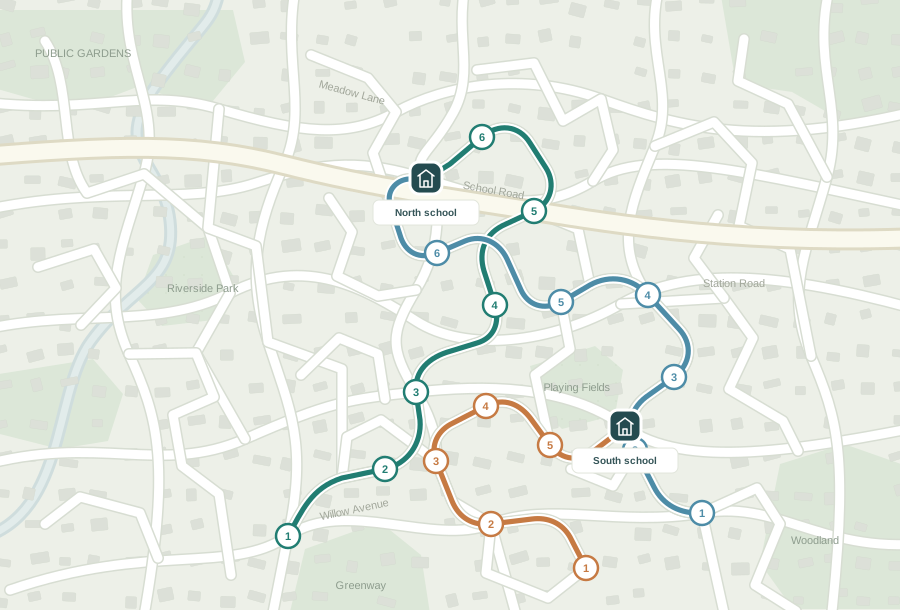
Plan morning and afternoon journeys, inspect the stop order and publish fixed collection times. Keep that timetable until you deliberately replace it.
Journey planning workspace
Product illustrations use fictional examples and a schematic street map. In the council workspace, saved road and pedestrian routes are displayed over the configured basemap.
EFFICIENCY WITH THE INDIVIDUAL IN VIEW
Work towards efficient use of vehicles while keeping each child’s requirements part of the planning process.
Talk through your requirementsInclude wheelchair spaces, lift requirements, helper seats and extra collection time. Keep individual travel and incompatible pupil rules in the plan.
Work with school start and finish times, weekday variations and selected vehicle entrances. Allow multi-school journeys where appropriate.
Create an OpenStreetMap-based draft, refine with traffic-aware routing when requested, then review before replacing the published timetable.
BEYOND THE ROUTE LINE
Give council and transport teams a shared view of what is planned, what has changed and what needs attention.
Route maps with street context, ordered stops and collection times. Keep the contact and support information needed for each assigned journey close to hand.
Bring Street Manager updates alongside planned routes to identify potential clashes for review and coordinate the response with transport providers.
A dedicated council address and branding, with secure sign-in and controlled access. Admin import and export tools support changes to your core records.
A FEW PRACTICAL QUESTIONS
No. SchoolRoute keeps the published recurring timetable, including fixed pickup times, until your team explicitly replaces it. You can review termly, after pupil or fleet changes, or whenever the service needs a new plan.
Pupil records capture accessibility, wheelchair, passenger assistance and collection needs, as well as individual or incompatible travel arrangements. These requirements feed the planning constraints alongside vehicle capacity and school times.
No. The calculated pedestrian route provides evidence for the assessment. The council officer records the safety review, decision and reasons, with their name and action date. A route calculation does not replace that judgement.
Yes. Draft ReRoute uses an OpenStreetMap-based routing model. Traffic-aware routing is a separate, deliberate action using the configured provider. Drafts and published timetables remain distinct so the team can review the results.
Start with a demonstration of the pupil-to-timetable workflow. We can then discuss a scoped evaluation, your data requirements, mapping and routing arrangements, and the controls needed before live operational use.
LET’S LOOK AT YOUR HOME-TO-SCHOOL SERVICE
Talk to Nick about your pupils, schools, fleet and planning process. We’ll walk through SchoolRoute and explore how a practical evaluation could work for your team.
Nick Gardiner · Civicsoft